Gematria Knowledge Base
How to Use a Gematria Calculator
A complete Beginner’s step-by-step guide
Published by
/
Knowing how to use a gematria calculator makes it easy to find the numerical value of a word, name, or phrase without manually looking up every letter and adding the values yourself.
To use a Gematria Calculator, enter your text, choose an English Gematria method, run the calculation, and review the generated result.
The calculator automatically applies the selected letter-value system and displays the final Gematria value based on that method.
The four English Gematria methods supported by our calculator are:
- English Ordinal
- Full Reduction
- Reverse Ordinal
- Reverse Full Reduction
Because each method uses a different letter-value system, the same word can produce different results depending on the selected method.
This guide explains exactly how to use a Gematria Calculator and how to understand the results correctly.
Before you learn how to use a gematria calculator, it helps to know that gematria is an old practice of assigning numbers to letters. For background on its history, see Britannica’s overview of gematria or the Wikipedia article on gematria. This guide focuses only on the four English methods supported by our calculator.
Contents
Getting Started: How to Use a Gematria Calculator
Using an English Gematria Calculator usually involves three main parts:
- Entering the text you want to calculate
- Selecting a Gematria method
- Reviewing the calculated result
The calculator performs the same basic process that would normally require manual work (see how Gematria works and the English Gematria chart A–Z for the letter values behind it):
Text input → Letter values → Calculation → Numerical result

Instead of checking each letter individually, the calculator applies the selected method automatically.
This makes it useful for:
- Words
- Names
- Phrases
- Short sentences
- Multiple text calculations
How to Use a Gematria Calculator Step by Step
Step 1: Enter the Word or Phrase You Want to Calculate
The first step is entering the exact text you want to analyze.
You can enter:
A single word
Example:
CAT
A name
Example:
DAVID
A phrase
Example:
HELLO WORLD
The calculator uses the letters in your input to generate the numerical value.
Because Gematria calculations depend on letters, spelling is important.
For example:
CAT
and:
CATS
will produce different results because the letters are different.
Before calculating, check that your spelling matches the word or phrase you want to evaluate.
Step 2: Select an English Gematria Method
After entering your text, choose the calculation method.
The selected method determines how each letter receives its numerical value.
The calculator supports four English Gematria systems:
| Method | How it works | Example |
|---|---|---|
| English Ordinal | English Ordinal uses the normal alphabetical position of each letter. This method follows the standard order of the English alphabet. | A = 1 B = 2 C = 3 Z = 26 |
| Full Reduction | Full Reduction converts letter values into a repeating 1–9 pattern. The sequence continues throughout the alphabet. | A = 1 B = 2 C = 3 I = 9 J = 1 |
| Reverse Ordinal | Reverse Ordinal uses the alphabet in reverse numerical order. | A = 26 B = 25 C = 24 Z = 1 |
| Reverse Full Reduction | Reverse Full Reduction combines reverse alphabet order with reduced numerical values. The assigned values follow the reverse reduced pattern. | — |
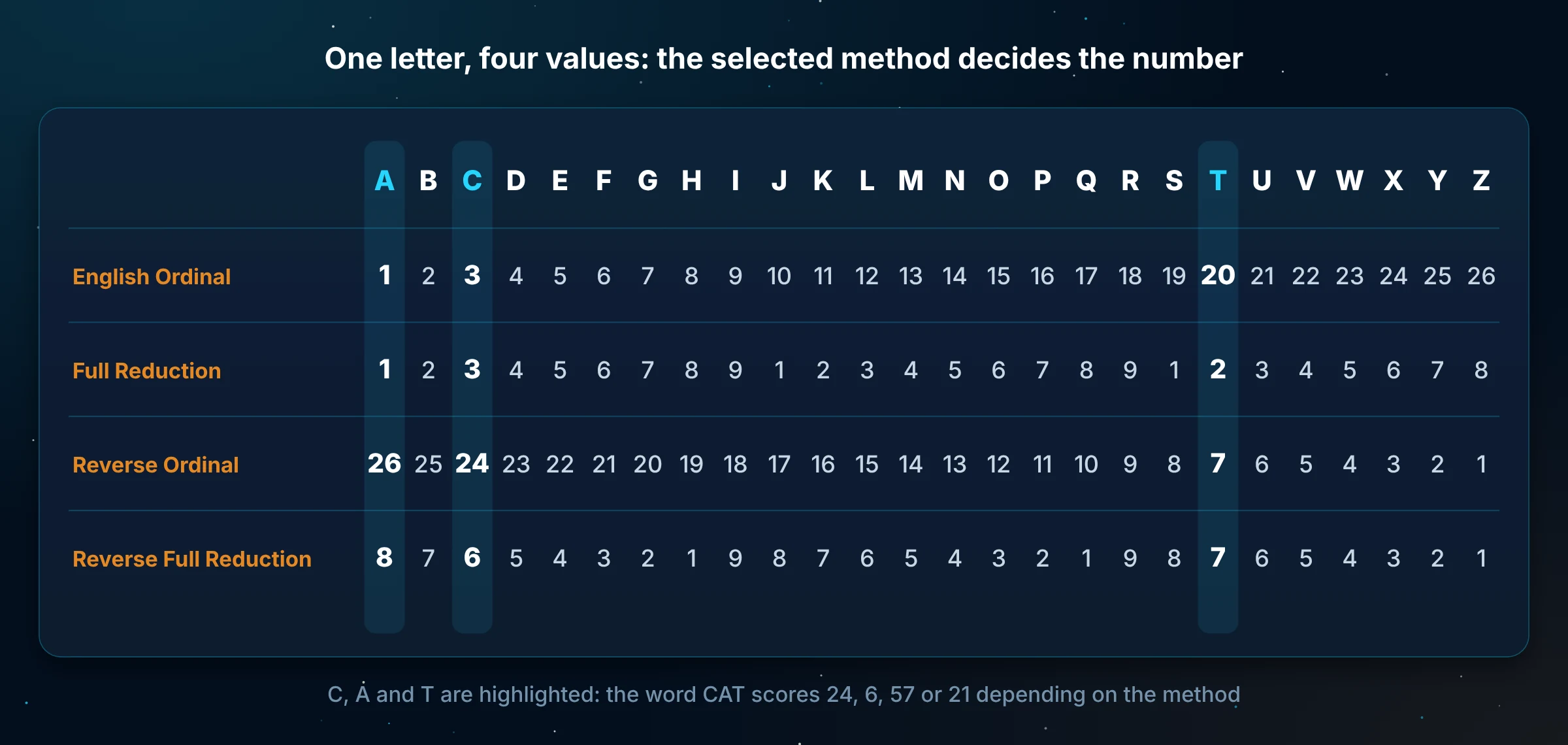
The important point is that the calculator can only apply one selected method at a time.
Changing the method changes the result because the letter values change.
Step 3: Run the Calculation
Once your text and method are selected, start the calculation.
The Gematria Calculator automatically:
- Reads each letter
- Assigns the correct numerical value
- Adds the values together
- Displays the final result
For example, if you enter:
CAT
and select:
English Ordinal
the calculator processes:
C = 3
A = 1
T = 20
Then calculates:
3 + 1 + 20 = 24
The result displayed is:
CAT = 24 using English Ordinal
You do not need to manually calculate each letter when using the tool.
Step 4: Understand the Gematria Result
A Gematria result contains two important parts:
- The numerical value
- The calculation method used
For example:
HELLO = 52 using English Ordinal
This is more useful than:
HELLO = 52
because the same word may produce a different value under another English Gematria method.
When recording or comparing results, always include the selected method.
Step 5: Review the Letter Breakdown
Many Gematria Calculators provide a letter-by-letter breakdown.
This shows how the final number was created.
For example:
Input:
CAT
Breakdown:
C → 3
A → 1
T → 20
Total:
3 + 1 + 20 = 24
The breakdown helps you:
- Verify the calculation
- Find spelling mistakes
- Understand how each letter contributes
- Compare results between methods
This is especially useful for longer words and phrases.
Example: How to Use a Gematria Calculator for a Word
Let’s calculate:
CAT
Step 1:
Enter:
CAT
Step 2:
Select:
English Ordinal
Step 3:
The calculator assigns:
C = 3
A = 1
T = 20
Step 4:
The calculator adds:
3 + 1 + 20 = 24
Final result:
CAT = 24 using English Ordinal
If you change the method, the result will change because the letter values are different.
Example: Using a Gematria Calculator for a Phrase
A calculator can also process longer text.
Example:
HELLO WORLD
The calculator reads all letters in the phrase.
Using English Ordinal:
HELLO:
H = 8
E = 5
L = 12
L = 12
O = 15
Total:
52
WORLD:
W = 23
O = 15
R = 18
L = 12
D = 4
Total:
72
Combined result:
52 + 72 = 124
Therefore:
HELLO WORLD = 124 using English Ordinal
The space between words does not receive a numerical value.
How to Compare Different Gematria Methods Using a Calculator
One advantage of a Gematria Calculator is that you can quickly compare the same input using different methods.
For example:
Input:
CAT
Possible results:
| Method | Result |
|---|---|
| English Ordinal | 24 |
| Full Reduction | 6 |
| Reverse Ordinal | 57 |
| Reverse Full Reduction | 21 |
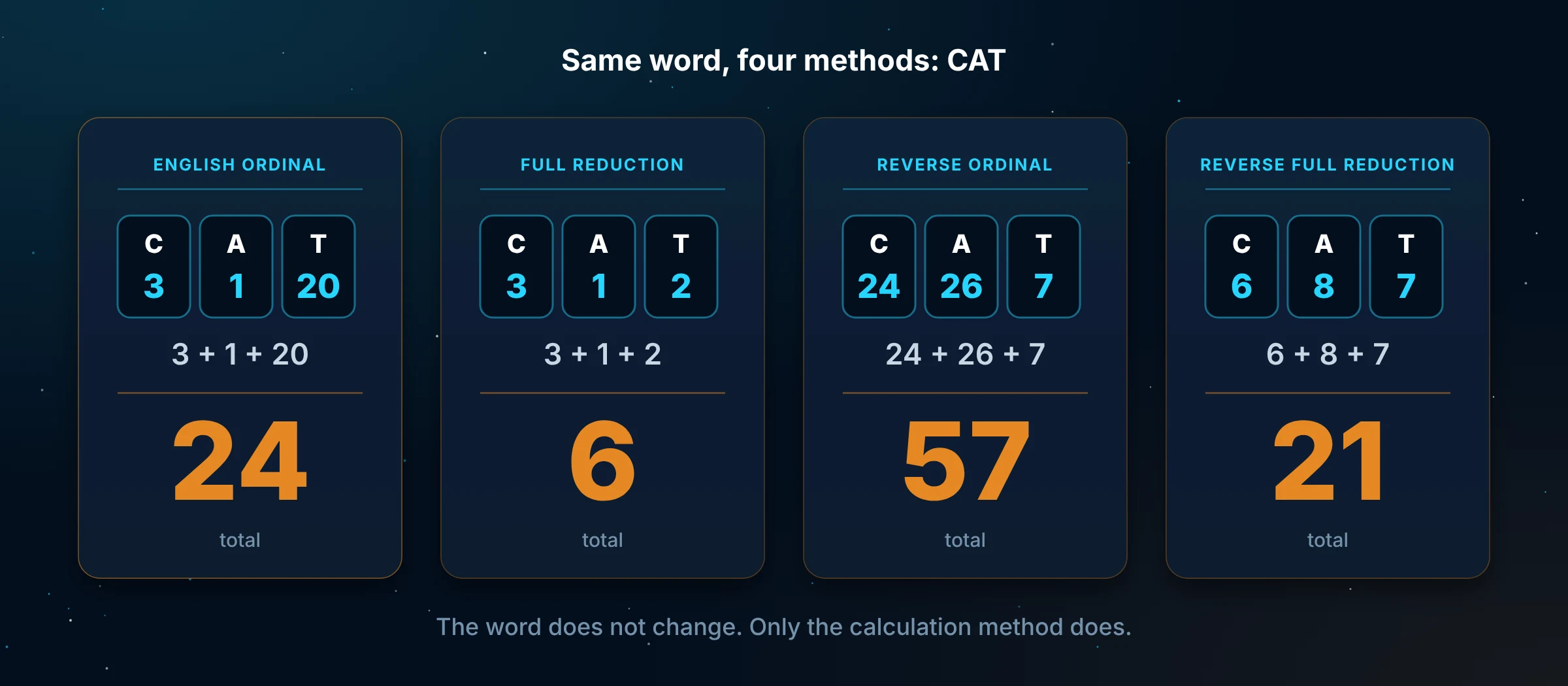
The word has not changed.
Only the calculation method has changed.
This allows users to see how different English Gematria systems produce different numerical totals.
What Can You Calculate With a Gematria Calculator?
A Gematria Calculator can be used for different types of text.
Words
Example:
MOON
Names
Example:
SARAH
The calculator processes each letter and returns the total according to the selected method.
Phrases
Example:
GOOD MORNING
The calculator combines the values of all letters in the phrase.
Short Sentences
Example:
THE SKY IS BLUE
Longer text can also be calculated, although longer inputs require more processing because more letters are included.
What Happens to Spaces and Capital Letters?
Spaces
Spaces do not have numerical values.
For example:
HELLO WORLD
is calculated using:
HELLO + WORLD
The space between the words is ignored.
Capital and Lowercase Letters
Uppercase and lowercase letters represent the same alphabet character.
For example:
A and a
have the same value.
The calculator focuses on the letter itself, not the capitalization.
Why Is My Gematria Result Different?
Sometimes a result may not match another calculation.
Common reasons include:
Different Gematria Method
The most common reason is using different methods.
For example:
English Ordinal and Full Reduction assign different values to many letters.
Different Spelling
Even one changed letter can affect the final result.
Always check the entered text.
Different Input
A phrase with an additional word will produce a different result.
Compare the exact same text when checking calculations.
Manual Calculation Mistake
If you calculated the value yourself, check:
- Letter values
- Addition
- Selected method
The calculator can be used to verify your manual result.
Common Mistakes When Using a Gematria Calculator
Choosing a Method Without Checking It
Always confirm the selected Gematria system before calculating.
Comparing Results From Different Methods
A value from English Ordinal should not be directly compared with a Full Reduction result without considering the method difference.
Entering Incorrect Spelling
The calculator only processes the text entered.
A spelling mistake creates a different calculation.
Forgetting to Record the Method
Always save results with the method name.
Example:
Correct:
HELLO = 52 using English Ordinal
Less clear:
HELLO = 52
Frequently Asked Questions
How do you use a Gematria Calculator?
Enter your word or phrase, select an English Gematria method, run the calculation, and review the displayed numerical result.
What can I enter into a Gematria Calculator?
You can enter words, names, phrases, and other text made from English alphabet letters.
Do spaces count in a Gematria Calculator?
No. Spaces are ignored because they are not letters and do not have numerical values.
Do uppercase and lowercase letters have different Gematria values?
No. Uppercase and lowercase versions of the same letter have the same numerical value.
Why does the same word have different Gematria results?
Different English Gematria methods assign different values to letters, which changes the final total.
Can a Gematria Calculator replace manual calculation?
Yes. A calculator performs the letter-value assignment and addition automatically, making calculations faster and easier to verify.
Which Gematria method should I select?
Choose the method that matches the calculation system you want to use. The important rule is to use the same method consistently.
Quick Guide: How to Use a Gematria Calculator
The process can be summarized as:
- Enter your word or phrase
- Select an English Gematria method
- Run the calculation
- Review the letter breakdown
- Record the result with the selected method
A Gematria Calculator saves time by automatically applying letter values and calculating totals that would otherwise require manual work with an English Gematria chart.
Conclusion
Learning how to use a Gematria Calculator is simple once you understand the basic workflow.
Enter your text, select one of the supported English Gematria methods, and review the calculated value.
The most important part is understanding that different methods produce different results. Always check the selected system and record the final number together with the method used.
A Gematria Calculator provides a faster way to calculate word and phrase values while following the same principles used in manual English Gematria calculations.
About this guide
Written and maintained by the My Gematria Calculator editorial team. Every value is added up from the fixed English Gematria chart A–Z. Read our editorial policy and methodology. Last reviewed 31 October 2026.